The Ethereal Glow: Unveiling Kindle’s Battery Longevity
For avid readers, the perpetual quest for power often overshadows the joy of immersion. The modern digital landscape, while offering unparalleled access to literature, is frequently hampered by the insatiable appetite of our devices for electricity. Mobile phones and tablets, indispensable as they are, demand frequent charging, interrupting the flow of a captivating narrative. This is where the Amazon Kindle emerges as a beacon of enduring battery life, a testament to thoughtful design and the revolutionary power of E-Ink technology. Unlike the vibrant, backlit screens of conventional tablets, the Kindle’s display mimics the appearance of real paper, a crucial distinction that underpins its remarkable power efficiency. This article delves into the intricate mechanisms behind the Kindle’s extended battery performance, exploring the core principles of E-Ink and the intelligent power management strategies employed by Amazon to ensure readers can lose themselves in stories for weeks, not hours, on a single charge.
In exploring the ways in which Kindle devices conserve battery life, it’s interesting to note the various features that contribute to their efficiency. For a deeper understanding of this topic, you can read an insightful article that discusses the innovative technologies behind Kindle’s battery-saving capabilities. Check it out here: How Kindle Saves Battery.
The Canvas of E-Ink: A Revolutionary Display Technology
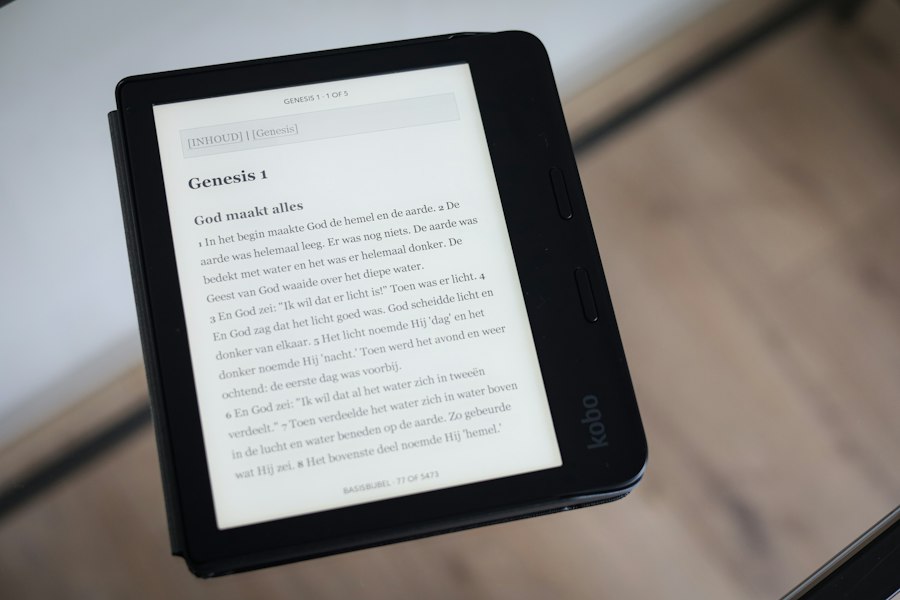
The heart of the Kindle’s battery prowess lies in its E-Ink display, a technology that fundamentally redefines how we perceive digital text. E-Ink, also known as electrophoretic ink, operates on a completely different principle than the light-emitting pixels of LCD or OLED screens. Instead of producing its own light, E-Ink displays are reflective, much like traditional paper. This inherent characteristic dramatically reduces power consumption, as the screen only requires energy when the image is being updated, not to maintain it.
Microscopic Particles in Motion: How E-Ink Works
At its core, E-Ink technology relies on a matrix of microscopic black and white charged particles suspended within clear capsules. These capsules are then encapsulated between two transparent electrodes. When an electrical charge is applied to these electrodes, it manipulates the movement of the charged particles. For instance, to display black text on a white background, a positive charge is applied to the back electrode and a negative charge to the front. This draws the black particles to the surface of the capsule, making them visible to the reader, while the white particles recede to the back. Conversely, to display white space, the polarity is reversed, pushing the white particles to the front. This binary manipulation of particle positions is what forms the text and images on the Kindle screen. The beauty of this process is that once the particles are in place, they remain there without requiring continuous power. This “bistable” nature of E-Ink is the primary driver of its exceptional battery efficiency.
The Illusion of Paper: Benefits of Reflective Displays
The reflective nature of E-Ink screens offers a host of advantages beyond mere power savings. Firstly, it significantly reduces eye strain, a common complaint among users of traditional backlit displays. Because the Kindle screen reflects ambient light, it simulates the experience of reading a physical book, making it far more comfortable for extended reading sessions. There is no harsh blue light emitted from the screen, contributing to a more natural and relaxing reading experience, especially in low-light conditions where traditional screens can feel particularly glaring. This lack of self-illumination also means that battery power is not being dissipated to light up millions of tiny pixels constantly. Instead, the power is only consumed during the brief moments when the screen refreshes to display a new page or character. This is a stark contrast to smartphones and tablets, where the backlight is always on, drawing a constant stream of power.
Contrast and Clarity: A Focus on Readability
While E-Ink might not boast the vibrant colors or rapid refresh rates of modern LCDs, its strength lies in its exceptional contrast and clarity for text. The stark distinction between the black particles and the white background creates crisp, sharp text that is easy to read. This clarity is further enhanced by the matte finish of most E-Ink screens, which minimizes glare and reflections, even in bright sunlight. This makes Kindles ideal for outdoor reading, a scenario where backlit tablets often become unusable due to screen washout. The E-Ink display truly excels at its intended purpose: presenting text in a highly legible and comfortable manner, all while being remarkably gentle on the device’s battery.
Intelligent Power Management: Beyond the Display
While E-Ink technology is the foundational pillar of the Kindle’s battery life, Amazon’s engineers have implemented a sophisticated suite of power management strategies to further optimize energy consumption. These features work in tandem with the E-Ink display to maximize the time between charges, ensuring that readers can embark on lengthy literary journeys without interruption.
The Art of the Sleep Mode: Conserving Power When Idle
One of the most effective ways any electronic device conserves power is by intelligently entering low-power states when not in active use. The Kindle excels in this regard through its advanced sleep mode. When the device is not being actively used for reading – for instance, when the cover is closed or if it’s left idle for a short period – the Kindle swiftly transitions into a deep sleep state. In this mode, the E-Ink display remains static, displaying the last viewed page or a screensaver, while nearly all other components of the device are powered down. The Wi-Fi and Bluetooth radios are deactivated, the processor is placed in a low-power state, and the screen’s refresh mechanism is completely disengaged. This hibernation is so efficient that a Kindle can remain in sleep mode for weeks on end without experiencing a significant drain on its battery. The only power consumption in this state is negligible, typically just enough to maintain the integrity of the internal clock and the E-Ink display’s current state.
The Subtle Art of Refresh: Minimizing Screen Updates
As discussed earlier, the E-Ink screen only consumes power when it needs to change the displayed image. However, even these screen updates can contribute to battery drain if not managed judiciously. Kindle devices employ various strategies to minimize the frequency and intensity of screen refreshes. When a page is turned, the Kindle performs a full page refresh, which involves moving all the particles to their new positions. This is the most power-intensive operation for the E-Ink display. However, in between these full refreshes, the Kindle may perform partial updates for certain elements, such as displaying the page number or loading the next page in the background. The algorithms behind these updates are designed to be as efficient as possible, often only updating the specific pixels that need to change. Furthermore, the Kindle has settings that allow users to adjust the refresh rate, enabling a balance between perceived responsiveness and battery longevity. While a faster refresh rate might make page turns feel more instantaneous, opting for a slightly slower refresh can further conserve battery power.
Optimizing Background Processes: Eliminating Unnecessary Activity
Beyond the display itself, electronic devices often have background processes that silently consume power. The Kindle is designed to be singularly focused on the reading experience, and as such, it aggressively manages any background activity that isn’t essential to this core function. Features like automatic syncing of reading progress and downloads are handled efficiently and often batched together to minimize the need for constant Wi-Fi activation. When not actively downloading new books or syncing progress, the Wi-Fi radio is turned off. Similarly, Bluetooth connectivity, if enabled for audiobooks or external keyboards, is only active when actively paired and in use. The operating system itself is streamlined, stripping away unnecessary background applications and services that would be commonplace on a more feature-rich tablet. This focused approach ensures that the device’s resources are dedicated solely to providing a seamless and energy-efficient reading experience.
The Impact of Reading Habits: User-Defined Power Consumption
While the underlying technology and software are crucial to the Kindle’s battery life, the user’s own reading habits also play a significant role in determining how long a single charge will last. Understanding these factors can empower users to further maximize their Kindle’s endurance.
Active Reading vs. Idle Time: The Distinction in Power Draw
The most significant determinant of battery life is, naturally, how much the Kindle is actively used for reading. When a user is actively turning pages, the E-Ink display is performing its primary function, consuming a small but consistent amount of power with each page turn. Conversely, periods of inactivity, where the Kindle is left open to a page or in sleep mode, consume virtually no power. This is why Amazon’s stated battery life figures are often expressed in “weeks” rather than “hours” – they assume a moderate amount of daily reading time, interspersed with significant periods of inactivity. A user who reads for several hours each day will naturally deplete the battery faster than someone who reads for 30 minutes daily. However, even with extensive daily reading, the Kindle’s battery life will still far outstrip that of a conventional tablet.
Connectivity Choices: Wi-Fi and Bluetooth as Power Consumers
As mentioned earlier, Wi-Fi and Bluetooth are the most power-hungry components of any portable electronic device. While the Kindle’s E-Ink display is incredibly efficient, constant connectivity will inevitably drain the battery more rapidly. Browsing the Kindle store, downloading new books, or syncing reading progress all require the Wi-Fi radio to be active. Similarly, if using the Kindle for listening to audiobooks via Bluetooth headphones or for typing with a Bluetooth keyboard, the Bluetooth radio will be engaged. Therefore, users who prioritize maximum battery life can choose to limit their Wi-Fi usage to when they are actively downloading content or syncing. Turning off Wi-Fi when not needed can significantly extend the time between charges. The same applies to Bluetooth connectivity. While convenient, these wireless features represent the primary antagonists to long battery life on the Kindle.
Screen Brightness and Font Size: Subtle but Significant Factors
While the Kindle’s primary display is reflective, most newer models do incorporate a front light to aid reading in low-light conditions. This front light, while significantly less power-intensive than a tablet’s backlight, does consume some battery power when active. Therefore, keeping the front light brightness at the lowest comfortable setting, or even turning it off entirely in well-lit environments, can contribute to extended battery life. Similarly, the font size, while not a direct power consumer, can indirectly influence battery life by affecting how many pages a user needs to turn to consume the same amount of text. Larger font sizes might lead to more page turns over a reading session, subtly increasing power consumption. While these are minor factors compared to connectivity or active reading time, they represent opportunities for dedicated users to eke out even more life from their Kindle’s battery.
Many readers appreciate how Kindle devices are designed to save battery life, allowing for extended reading sessions without frequent recharging. This efficiency is largely due to the E Ink technology used in Kindle screens, which consumes minimal power compared to traditional backlit displays. For those interested in exploring more about the science behind such innovations, a related article can be found at Freaky Science, where you can learn about various technological advancements that enhance our everyday devices.
The Kindle Ecosystem: Software and Hardware Synergies
| Feature | Description | Impact on Battery Life | Typical Battery Saving |
|---|---|---|---|
| E-Ink Display | Uses electronic ink technology that only consumes power when changing pages. | Significantly reduces power consumption compared to LCD screens. | Up to 8 weeks of reading on a single charge (based on 30 minutes/day). |
| Adjustable Front Light | Uses LED front lighting that can be dimmed or turned off to save power. | Lower brightness settings extend battery life. | Brightness at 50% can extend battery life by 20-30% compared to max brightness. |
| Wi-Fi Off Mode | Disabling Wi-Fi when not in use prevents background data syncing. | Reduces power drain from wireless communication. | Can add several days to battery life. |
| Power Efficient Processor | Uses low-power processors optimized for reading tasks. | Minimizes energy consumption during page turns and navigation. | Contributes to overall multi-week battery life. |
| Sleep Mode | Automatically enters low power state when not in use. | Prevents unnecessary battery drain during inactivity. | Helps maintain battery over weeks of intermittent use. |
The exceptional battery life of the Kindle is not solely a result of its E-Ink display and basic power management. Amazon has meticulously designed its hardware and software ecosystem to work in concert, creating a reading experience that is both immersive and remarkably energy-efficient.
Firmware Optimization: A Constantly Evolving Efficiency
The Kindle’s firmware, the underlying software that controls its operations, is continuously refined by Amazon to improve both performance and power efficiency. Updates are frequently released that optimize background processes, refine screen refresh algorithms, and enhance the sleep mode functionality. These updates are often transparent to the user, meaning that without even realizing it, the Kindle’s battery performance can improve over time as Amazon rolls out new optimizations. The company’s dedication to this ongoing firmware development ensures that the Kindle remains a leader in battery longevity, adapting to new insights and technological advancements in power management.
Hardware Design: A Purpose-Built Reading Device
Beyond the software, the hardware itself is designed with battery efficiency in mind. The Kindle’s processor is not the powerful, multi-core chip found in a tablet; instead, it’s a more specialized processor optimized for the specific tasks of E-Ink display management and basic user interface navigation. This less demanding processor requires significantly less power. Furthermore, the internal components are chosen for their low power consumption, from the memory chips to the Wi-Fi and Bluetooth modules. The overall architecture of the Kindle is geared towards a singular purpose: providing an exceptional reading experience with minimal power draw. This focus allows for the use of smaller, less power-hungry batteries, which in turn contributes to the Kindle’s lightweight and portable design.
The Advantage of a Dedicated Device: No Feature Bloat
Unlike multipurpose tablets, which are designed to handle a vast array of applications and tasks, the Kindle is a dedicated reading device. This lack of “feature bloat” is a significant advantage in terms of battery life. There are no background social media notifications, no constantly running email clients, and no resource-intensive games vying for processing power and draining the battery. The Kindle’s operating system is streamlined and focused, dedicating its resources almost exclusively to rendering text, managing the E-Ink display, and handling basic device functions. This deliberate simplification allows for a level of power efficiency that simply cannot be achieved by a device trying to be everything to everyone. The Kindle’s singular focus is its greatest strength when it comes to enduring battery performance.
Embracing the Freedom: The Practical Benefits of Long Battery Life
The technological marvels behind the Kindle’s battery life translate into tangible, everyday benefits for its users. This extended endurance liberates readers from the constant anxiety of a dying battery and opens up new possibilities for how and where reading can be enjoyed.
Unplugged Adventures: Travel and Extended Reading Sessions
The most immediate and perhaps the most profound benefit of the Kindle’s long battery life is the freedom it offers from the power outlet. For travelers, this is a game-changer. Long flights, train journeys, or remote camping trips no longer necessitate the careful rationing of device usage or the anxiety of finding a charging point. A Kindle can easily accompany a traveler for weeks, providing an endless supply of entertainment without the need for a charger. Similarly, avid readers can embark on extended reading binges, losing themselves in a gripping novel for an entire weekend without the looming threat of a depleted battery. This uninterrupted immersion is a luxury often denied by other portable electronics.
Reduced Clutter and Convenience: One Less Cable to Worry About
In an increasingly connected world, our lives are often burdened by a multitude of charging cables for various devices. The Kindle, with its infrequent charging needs, significantly reduces this cable clutter. Carrying a Kindle charger might become a rare occurrence, simplifying packing and reducing the overall number of accessories needed for daily life or travel. This convenience extends to everyday use as well. The ability to pick up a Kindle and know that it’s ready for hours of reading, without a second thought about its charge level, enhances the overall user experience and makes reading a more spontaneous and accessible activity.
Environmental Considerations: A More Sustainable Choice
While not always the primary consideration for consumers, the energy efficiency of the Kindle also presents a more sustainable choice in the long run. Devices that require less frequent charging consume less electricity over their lifespan. This reduced energy demand, when scaled across millions of users, can contribute to a lower overall environmental footprint. The E-Ink technology itself is also often cited as being more environmentally friendly to manufacture and dispose of compared to the complex backlighting technologies of traditional screens. In an era where sustainability is increasingly important, the Kindle’s inherent efficiency offers a small but significant step towards more eco-conscious technology consumption. The freedom from constant charging is not just a convenience; it’s a reflection of a more mindful approach to technology’s energy impact.

Why Your Kindle Screen Doesn’t Work the Way You Think
FAQs
1. How does Kindle save battery power?
Kindle saves battery power by using an E Ink display technology that only consumes power when the screen is refreshed, unlike traditional LCD screens that require constant power to display images.
2. Does adjusting the screen brightness help save battery on a Kindle?
Yes, lowering the screen brightness on a Kindle can significantly help save battery power. Dimming the screen reduces the amount of power needed to illuminate the display, thus extending the device’s battery life.
3. Is enabling airplane mode beneficial for conserving battery on a Kindle?
Enabling airplane mode on a Kindle can help save battery by turning off wireless connections such as Wi-Fi and cellular data. When these connections are disabled, the device consumes less power, leading to longer battery life.
4. How does putting a Kindle into sleep mode contribute to battery conservation?
Putting a Kindle into sleep mode helps conserve battery by suspending most device operations while keeping the screen off. In this state, the device consumes minimal power, allowing the battery to last longer between charges.
5. Does updating the software on a Kindle impact battery performance?
Updating the software on a Kindle can sometimes improve battery performance by optimizing power management algorithms and fixing bugs that may have been causing excessive power consumption. It is recommended to keep the device’s software up to date for optimal battery efficiency.