
The persistent glow of backlit screens has become an inescapable fixture in modern life, leading to a widespread concern: eye strain. This discomfort, characterized by dry eyes, headaches, blurred vision, and fatigue, can significantly detract from the enjoyment and efficiency of reading. While traditional e-readers featuring E Ink displays have long been lauded for their paper-like appearance, a deeper dive into the technology reveals why they offer a compelling solution to digital eye strain and how users can maximize their benefits for a more comfortable reading experience.
Understanding E Ink’s Advantage Over Backlit Displays
The fundamental difference between E Ink displays and those found on smartphones, tablets, and laptops lies in their illumination. Backlit displays emit light directly towards the viewer’s eyes. This constant emission, especially at higher brightness levels, forces the eye muscles to work harder to focus, contributing to fatigue and strain. Over extended periods, this can exacerbate symptoms of dry eye due to reduced blinking rates, as individuals tend to blink less when concentrating on a bright screen. The harsh light can also disrupt natural sleep patterns if viewed close to bedtime.
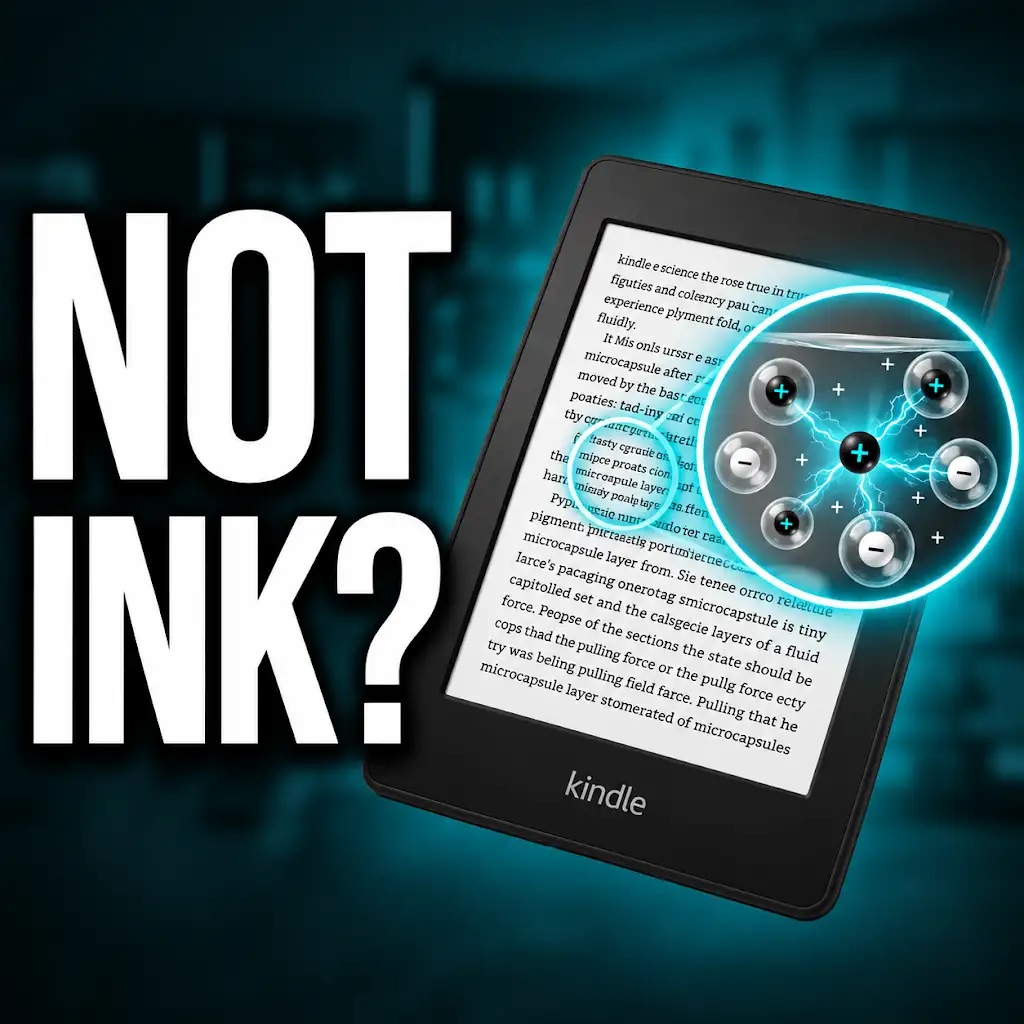
E Ink technology, conversely, functions by reflecting ambient light, much like a printed page in a book. Instead of generating light, it utilizes tiny, charged particles (pigments) that are manipulated by an electric field to form images and text. This electrophoretic display technology creates a passive image that remains static without consuming power until a refresh is needed. This fundamental difference in light interaction is the cornerstone of E Ink’s eye-friendly reputation. The absence of direct, constant light emission means the user’s eyes are not subjected to the same level of visual stress. It mimics the natural reading experience of paper, a medium that has been used for centuries without contributing to the modern phenomenon of digital eye strain. This passive illumination is a significant departure from the active illumination of most digital devices, making E Ink a preferred choice for extended reading sessions.
The Science of Light and Vision
The human eye is designed to perceive reflected light. Our natural world is illuminated by the sun, and we interact with objects by observing the light they reflect. Backlit screens, by emitting their own light, disrupt this natural process. The constant barrage of photons directly into the eye can overload the photoreceptor cells, leading to a sensation of glare and discomfort. Furthermore, the varying light intensity and contrast on backlit screens can cause the pupils to constantly adjust, further taxing the eye muscles. Studies have shown that prolonged exposure to the blue light emitted by many backlit screens can also contribute to visual fatigue and, in some cases, disrupt the body’s natural circadian rhythm, affecting sleep quality. E Ink’s reflective nature, on the other hand, reduces glare and provides a more stable visual stimulus, allowing the eyes to relax and focus more naturally. The contrast on an E Ink screen is typically a stark black on a white background, similar to a printed page, which is optimal for readability and reduces visual noise. This passive viewing experience is crucial for mitigating the symptoms associated with digital eye strain.
Reduced Blue Light Emission
A significant concern with modern digital devices is the emission of blue light, a high-energy wavelength known to contribute to eye strain and disrupt sleep. Backlit screens, particularly those with LED illumination, are often major sources of blue light. Prolonged exposure can lead to retinal fatigue and discomfort. E Ink technology, by its very nature, emits very little to no blue light. The light used to illuminate an E Ink screen is typically a gentle, warm LED backlight that is directed from the side or front, illuminating the screen rather than shining directly into the eyes. This directional lighting is much less intrusive and significantly reduces the amount of blue light reaching the user’s eyes. This makes E Ink devices particularly suitable for reading in low-light conditions without the adverse effects associated with traditional backlighting. The reduced blue light emission contributes to a more natural and less disruptive reading experience, especially during evening hours.
If you’re concerned about eye strain caused by e-ink displays, you might find it helpful to read a related article that discusses various strategies to minimize discomfort while using these devices. The article provides insights into the benefits of e-ink technology and offers tips for reducing eye strain during prolonged use. For more information, you can check out the article at Freaky Science.
E Ink’s Unique Display Characteristics
The distinctive appearance of E Ink displays is a direct result of its underlying technology, offering several key characteristics that contribute to reduced eye strain. These displays are often referred to as “paper-like” for good reason, and understanding these nuances further highlights their benefits. The visual quality is engineered to mimic the appearance and feel of printed text on paper, providing a familiar and comfortable reading environment.
Paper-Like Visuals and Contrast
The most striking feature of E Ink is its resemblance to printed paper. The display uses microcapsules containing black and white charged particles. When an electric field is applied, these particles move to the surface, forming text and images. This creates a high contrast ratio that is stable and crisp, eliminating the flicker or ghosting often associated with older LCD technologies. The matte finish of most E Ink screens also significantly reduces glare. Unlike glossy screens that reflect ambient light like a mirror, E Ink displays diffuse light, making them perfectly readable even in bright sunlight. This ability to be read comfortably outdoors without the need to find shade is a testament to its paper-like quality and a significant advantage for avid readers who enjoy consuming content in various environments. The fixed nature of the image, once rendered, also means there’s no inherent flicker that can fatigue the eyes over time.
Refresh Rate and Ghosting Considerations
A common characteristic of E Ink technology is its slower refresh rate compared to LCD or OLED displays. When an E Ink screen updates an image, it typically requires a full or partial screen refresh. This can sometimes lead to a phenomenon known as “ghosting,” where faint remnants of previous images remain visible. While this might be noticeable during rapid scrolling or page turns, for the primary purpose of reading static text, it is rarely an issue. Modern E Ink displays have significantly improved in this regard, with faster refresh rates and advanced ghosting reduction techniques. For typical reading, where the page content changes infrequently, the refresh rate is more than adequate and does not contribute to eye strain. The minimal “action” on the screen during reading allows the eyes to remain relaxed. The intentional design choices prioritize static readability over dynamic animation, which directly benefits users concerned about visual fatigue.
Maximizing Comfort with E Ink Devices

While E Ink technology inherently offers advantages, users can further enhance their reading comfort by implementing specific strategies and utilizing the features available on their devices. These tips address both the hardware and software aspects of the reading experience, ensuring optimal conditions for prolonged engagement with digital text.
Adjusting Brightness and Warmth Settings
Even though E Ink displays are not backlit in the same way as other screens, many modern e-readers incorporate a front light. This front light is crucial for reading in dim environments. However, it’s essential to use it judiciously. Start with the lowest brightness setting that allows for comfortable reading and gradually increase it as needed. Excessive brightness, even from a front light, can still cause discomfort. Many devices also offer adjustable color temperature settings, allowing users to shift the light from a cooler blueish hue to a warmer, amber tone. Warmer light is generally considered more relaxing for the eyes, especially in the evening, as it mimics natural candlelight and is less likely to interfere with melatonin production. Experimenting with these settings is key to finding the perfect balance for individual comfort. The ability to fine-tune these parameters is a crucial aspect of personalized eye comfort on E Ink devices.
Font Size, Typeface, and Line Spacing
The visual presentation of text plays a significant role in reading comfort. E Ink devices offer a high degree of customization for these elements. Increasing the font size can reduce the need for the eyes to focus intensely on small characters, alleviating strain. Similarly, choosing a typeface that is designed for readability on digital screens, often referred to as a “sans-serif” font, can be beneficial. While serif fonts (like Times New Roman) are classic in print, some users find sans-serif fonts (like Arial or Helvetica) easier on the eyes in a digital context. Experimenting with different fonts available on the device is recommended. Furthermore, adjusting the line spacing (leading) can improve readability. Ample space between lines prevents the eye from jumping between lines and reduces the visual density of the text, making it easier to follow. Finding the optimal combination of font size, typeface, and line spacing is a personalized process that can significantly enhance the reading experience and reduce eye fatigue.
Practical Tips for Extended Reading Sessions
Beyond the inherent benefits of E Ink technology and device-specific settings, adopting good reading habits is paramount for minimizing eye strain. These habits, when combined with an E Ink device, create a holistic approach to comfortable digital reading. Consistency in these practices will yield the greatest benefits over time.
The Importance of Regular Breaks
The adage “all things in moderation” holds true even for comfortable reading. Despite the advantages of E Ink, extended, uninterrupted reading sessions can still lead to eye fatigue. The 20-20-20 rule is a highly recommended practice: every 20 minutes, take a 20-second break to look at something 20 feet away. This simple exercise allows the eye muscles to relax and refocus, preventing strain. Longer breaks, perhaps every hour, where one can get up, move around, and look away from the screen entirely, are also beneficial. These breaks help to prevent dryness by encouraging blinking and give the eyes a more substantial rest. Consciously incorporating these breaks into a reading routine is a proactive measure against digital eye strain.
Maintaining Proper Lighting and Ergonomics
While E Ink displays are forgiving in various lighting conditions, optimal comfort is achieved with appropriate ambient light. Avoid reading in complete darkness, as this can force the eyes to work harder to discern the text, even with a front light. Conversely, avoid overly bright or direct overhead lighting that can cause glare on the device, even with its matte finish. A soft, diffused light source, such as a desk lamp, is often ideal. Furthermore, proper posture and ergonomics are crucial. Ensure the device is held at a comfortable distance, typically arm’s length, and at a slight downward angle to reduce neck strain. Maintaining good posture and ensuring the reading environment is conducive to comfort will further enhance the benefits of E Ink technology.
Many people are becoming increasingly aware of the potential for eye strain caused by prolonged screen time, especially with the rise of digital devices. A related article discusses the benefits of e-ink technology in reducing eye strain compared to traditional screens. You can read more about this topic in the article found here, where various studies highlight how e-ink displays can provide a more comfortable reading experience.
E Ink’s Role in Eye Health and Well-being
| Metric | Value | Unit | Notes |
|---|---|---|---|
| Average Eye Strain Score (E-ink vs LCD) | 2.1 vs 4.5 | Scale 1-10 | Lower score indicates less eye strain on E-ink displays |
| Reading Duration without Discomfort | 120 | Minutes | Average continuous reading time on E-ink before eye discomfort |
| Blue Light Emission | 5 | nm (nanometers) | E-ink displays emit minimal blue light compared to LCD |
| Screen Flicker Rate | 0 | Hz | E-ink screens have no flicker, reducing eye strain |
| Contrast Ratio | 10:1 | Ratio | Typical contrast ratio for E-ink displays |
| Glare Level | Low | Qualitative | E-ink screens have matte surfaces reducing glare |
The cumulative effect of E Ink’s technology and mindful usage translates into significant benefits for long-term eye health and overall well-being. By addressing the root causes of digital eye strain, E Ink provides a sustainable alternative for avid readers and digital content consumers. The long-term implications for visual comfort are substantial.
Reducing the Risk of Digital Eye Strain Symptoms
The inherent design of E Ink displays, with their reflective, paper-like quality and reduced blue light emission, directly combats many of the common symptoms of digital eye strain. By minimizing glare, flicker, and direct light exposure, E Ink devices help to alleviate dry eyes, reduce headaches, and prevent blurred vision often associated with prolonged use of backlit screens. This makes E Ink a compelling choice for individuals who spend significant time reading digitally, whether for work, study, or leisure. The reduced visual stress contributes to a more pleasant and sustainable reading experience, allowing users to engage with content for longer periods without discomfort.
Enhancing Sleep Quality and Reducing Fatigue
The blue light emitted by backlit screens is a known disruptor of the body’s natural sleep-wake cycle. Exposure to blue light in the evening can suppress melatonin production, making it harder to fall asleep and impacting the quality of sleep. E Ink technology’s minimal blue light output, especially when using warmer light settings, significantly reduces this risk. This allows users to read comfortably before bed without the same level of concern about sleep disruption. By reducing visual fatigue and improving sleep quality, E Ink devices contribute to overall well-being, making readers feel more refreshed and less tired throughout the day. This holistic benefit extends beyond just the eyes, positively impacting energy levels and cognitive function.
Why Your Kindle Screen Doesn’t Work the Way You Think
FAQs
What is e ink and how does it work?
E ink is a type of electronic paper display technology that mimics the appearance of ink on paper. It works by using tiny microcapsules filled with positively charged white particles and negatively charged black particles. When an electric field is applied, the particles move to the top of the microcapsules, creating the desired text or image.
Does e ink cause less eye strain compared to traditional screens?
Yes, e ink displays are known to cause less eye strain compared to traditional screens such as LCDs or LEDs. This is because e ink reflects light like paper does, which is easier on the eyes and reduces glare and flicker that can lead to eye fatigue.
Can prolonged use of e ink devices still lead to eye strain?
While e ink displays are generally easier on the eyes, prolonged use of any digital device can still lead to eye strain. It is recommended to take regular breaks, adjust the lighting in your environment, and maintain a proper viewing distance to reduce the risk of eye strain.
Are there any specific tips to reduce eye strain when using e ink devices?
Some tips to reduce eye strain when using e ink devices include adjusting the font size to a comfortable level, ensuring proper lighting in the room, taking frequent breaks to rest your eyes, and maintaining a good posture while using the device.
Are there any studies supporting the claim that e ink causes less eye strain?
Yes, there have been studies that support the claim that e ink displays cause less eye strain compared to traditional screens. Research has shown that the reflective nature of e ink, similar to paper, reduces glare and flicker, making it more comfortable for extended reading sessions.