
The gentle glow of a tablet screen, while offering a gateway to countless digital worlds, can often come at a cost: eye strain. For prolonged reading sessions, the experience can quickly transform from immersive to irritating, marked by dryness, fatigue, and discomfort. In contrast, Amazon’s Kindle, with its signature E-Ink display, offers a different approach, one that prioritizes the reader’s visual comfort. This distinction is not merely a matter of preference; it is rooted in fundamental differences in how these technologies present information to the human eye, making the E-Ink screen demonstrably easier on one’s eyes than the backlit displays of traditional tablets.
The Science of Light: Emission vs. Reflection
At the heart of the difference between Kindle E-Ink and tablet displays lies the way they interact with light. Understanding this fundamental divergence is crucial to appreciating why one is superior for extended reading.
How Tablets Illuminate the Retina
Tablets, along with smartphones and most laptop screens, utilize what is known as a backlit display. This means that a light source, typically an LED panel, is positioned behind the display’s screen. This backlight shines through the pixels, illuminating them and, consequently, the image or text that is presented. When a user looks at a tablet screen, their eyes are not just seeing the content; they are also exposed to the direct emission of light from the device. This constant emission of light, particularly the blue light component often present in LED backlights, can contribute significantly to eye strain. The eyes are forced to constantly adapt to this direct light source, much like looking at a small, bright lamp for extended periods. This can lead to symptoms such as reduced blinking rates, dry eyes, blurred vision, and headaches, collectively known as digital eye strain or computer vision syndrome. The intensity of the backlight can also be adjusted, but even at lower settings, the fundamental nature of light emission remains. The vibrant colors and sharp contrasts that make tablets so engaging for multimedia consumption are a direct result of this active illumination. However, this very characteristic becomes a significant drawback when the primary objective is sustained, comfortable reading.
The E-Ink Advantage: Mimicking Paper
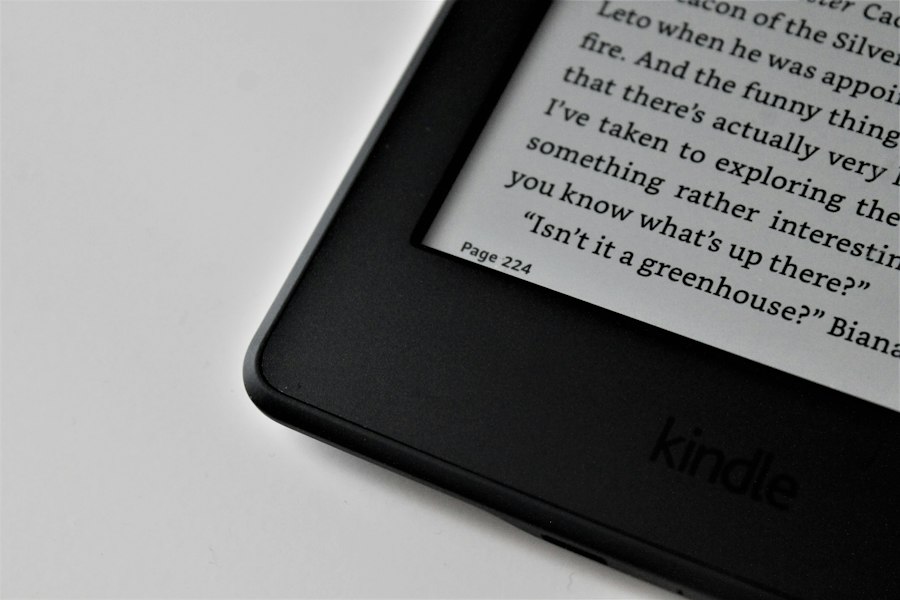
Kindle devices, on the other hand, employ E-Ink (Electronic Ink) technology. This revolutionary display fundamentally alters how text and images are rendered. Instead of emitting light, E-Ink screens reflect ambient light, much like a traditional piece of paper. The display is composed of millions of tiny microcapsules, each containing positively charged white particles and negatively charged black particles suspended in a clear fluid. When an electric field is applied, these particles move to the surface of the microcapsule, creating either a black or white dot. To form text or an image, the appropriate combination of black and white particles is brought to the surface across the entire display. This process is static; once the image is formed, no further power is required to maintain it. This means that E-Ink displays do not produce their own light. When reading on a Kindle, the reader’s eyes are illuminated by the surrounding environment, just as they would be when reading a physical book. This inherent lack of self-illumination is the primary reason for its reduced eye strain. The experience is akin to looking at a printed page, which has been the standard for centuries without inducing the specific types of eye strain associated with digital screens.
Many readers have found that using a Kindle is easier on the eyes compared to traditional screens, thanks to its e-ink technology that mimics the appearance of paper. This feature reduces glare and provides a more comfortable reading experience, especially during long sessions. For more insights on the advantages of e-readers like Kindle, you can check out a related article on this topic at Freaky Science.
The Impact of Blue Light and Screen Flicker

Beyond the fundamental difference in light emission versus reflection, two other critical factors contribute to the visual discomfort experienced with tablets: the prevalence of blue light and the subtle flicker of some displays, issues that E-Ink largely mitigates.
Blue Light’s Role in Digital Eye Strain
Tablets, and indeed most LED-backlit devices, emit a significant amount of blue light. Blue light is a high-energy visible light that can penetrate the eye and reach the retina. While natural blue light from the sun is beneficial for regulating our sleep-wake cycles, excessive exposure to artificial blue light, particularly at night, can disrupt melatonin production and affect sleep quality. More relevant to eye strain, prolonged exposure to blue light from screens has been linked to digital eye strain. It can cause visual fatigue, blurred vision, and discomfort. The intensity of blue light emitted by tablets can be particularly jarring to the eyes, forcing them to work harder to process the visual information. While some tablets offer “night mode” or “blue light filter” settings that tint the screen with warmer colors, these are often software-based adjustments that do not fundamentally alter the light-emitting nature of the display. They merely reduce the perceived blueness.
E-Ink’s Flicker-Free Experience
One of the subtle yet significant causes of eye strain in many backlit displays is screen flicker. To create the illusion of a stable image, backlit screens rapidly refresh. This refresh rate, while often imperceptible to the conscious eye, can still be detected by the brain and can contribute to visual fatigue over time. It’s a subtle stressor that the eyes are constantly working against. E-Ink technology, by its very nature, does not suffer from this flicker. Once an image is rendered on the E-Ink screen, it remains static until the next page turn or refresh. There is no constant refreshing or updating of pixels that would introduce flicker. This provides a remarkably stable visual experience that significantly reduces the burden on the eyes. The absence of flicker contributes to a more comfortable and natural reading environment, allowing users to read for much longer periods without experiencing the telltale signs of eye fatigue. This stability is a key differentiator that makes the Kindle a superior choice for dedicated readers.
Reading Comfort: A Psychological and Physiological Perspective
The benefits of E-Ink extend beyond the purely technical aspects of light and flicker. The way E-Ink displays present text and images also has a profound impact on the reader’s psychological and physiological experience, fostering a more enjoyable and less taxing reading environment.
The Analogy of Paper and Ink
The success of E-Ink technology can be largely attributed to its ability to closely mimic the experience of reading from a physical book. Traditional printed books have been the primary medium for disseminating knowledge and stories for centuries, and our visual systems have evolved to comfortably process information from paper. The matte surface of paper, the way ink sits on it, and the natural reflectivity all contribute to a comfortable viewing experience. E-Ink displays, with their matte finish and ability to reflect ambient light, replicate these qualities remarkably well. This familiar visual cue allows the brain to process the text in a more relaxed manner. There is no harsh glare or intense light source to contend with. The contrast between the black text and the white background is excellent, ensuring legibility without the visual assault often associated with backlit screens. This sensory familiarity reduces the cognitive load on the reader, allowing for deeper immersion in the content. The lack of the “screen effect” – the feeling of looking at a glowing rectangle – is a significant psychological advantage for extended reading.
Reduced Cognitive Load and Enhanced Focus
When reading on a backlit tablet, the eyes are constantly exposed to a light source that is actively engaged in projecting an image. This can create a subtle but persistent level of visual noise that the brain has to filter out. The vibrant colors, the potential for notifications, and the ever-present glow can all be distracting, even if subconsciously. E-Ink, by contrast, presents a clean, static image. The lack of self-illumination means that the screen recedes into the background, allowing the text to become the primary focus. This reduction in visual stimuli translates to a lower cognitive load. The brain doesn’t have to work as hard to process the visual information, freeing up mental resources for comprehension and enjoyment. This enhanced focus is particularly beneficial for academic reading, dense prose, or any situation where deep concentration is required. The E-Ink screen facilitates a more natural and less demanding interaction with the text, leading to improved comprehension and a more satisfying reading experience. The Kindle, in essence, prioritizes the act of reading itself, stripping away the distractions inherent in more general-purpose devices.
Practical Advantages for Long-Term Reading
The ease on the eyes offered by E-Ink translates into tangible practical advantages for anyone who spends significant time engrossed in reading. These benefits directly impact the duration and quality of reading sessions.
Extended Reading Sessions Without Fatigue
The most immediate and perhaps most significant practical advantage of an E-Ink screen is the ability to read for extended periods without experiencing the debilitating fatigue associated with backlit displays. Users can comfortably spend hours reading on a Kindle, turning page after page, without the onset of dry eyes, headaches, or blurred vision. This allows for a more immersive and uninterrupted reading experience. For avid readers, this means being able to finish a novel in a single sitting or delve into research papers without interruption. The ability to maintain focus and comfort over many hours is a testament to the E-Ink screen’s gentleness on the eyes. This is particularly important for students, academics, and anyone whose work or hobbies involve extensive reading. The Kindle becomes a tool that enables, rather than hinders, prolonged engagement with text. The absence of a need to constantly adjust brightness or battle glare further contributes to this sustained comfort.
Improved Accessibility and Readability in Various Lighting Conditions
The reflective nature of E-Ink displays also provides excellent readability in a wide range of lighting conditions, further enhancing the user’s reading experience. In bright sunlight, where backlit screens can become washed out and difficult to see, E-Ink displays perform exceptionally well. They actually become easier to read as the ambient light increases, much like a printed book. This makes them ideal for outdoor reading, travel, or simply reading by a window. Conversely, in low-light conditions, a built-in adjustable front light (a feature present on most modern Kindles) can be used to gently illuminate the screen from the top. This front light illuminates the surface of the E-Ink display, rather than shining directly into the reader’s eyes, as a backlight would. This targeted illumination provides sufficient brightness for comfortable reading in the dark without contributing to eye strain. This versatility in varying light conditions is a crucial advantage for readers who find themselves in diverse environments. The ability to seamlessly transition from bright sunlight to a dimly lit room without compromising readability or comfort is a significant benefit that backlit devices struggle to match.
Many readers have found that using a Kindle can be easier on the eyes compared to traditional printed books or tablets. This is largely due to the e-ink technology used in Kindle devices, which mimics the appearance of ink on paper and reduces glare. For those interested in exploring this topic further, an insightful article can be found at Freaky Science, where the benefits of e-readers are discussed in detail. This makes it clear why many people are making the switch to digital reading.
The Future of Reading and the Enduring Appeal of E-Ink
| Feature | Description | Benefit for Eyes | Comparison to LCD/LED Screens |
|---|---|---|---|
| E-Ink Display | Uses electronic ink technology that mimics the appearance of ink on paper. | Reduces glare and blue light exposure, minimizing eye strain. | Unlike backlit screens, E-Ink reflects ambient light, making it easier to read for long periods. |
| Adjustable Front Light | Built-in front light evenly illuminates the screen without shining directly into eyes. | Provides comfortable reading in low light without harsh brightness. | Backlit devices emit light directly into eyes, which can cause fatigue. |
| Non-Glare Screen | Matte screen surface reduces reflections from external light sources. | Prevents eye strain caused by glare and reflections. | Glossy screens on tablets and phones often cause distracting reflections. |
| High Contrast Text | Sharp black text on a white background optimized for readability. | Improves text clarity, reducing the effort needed to focus. | Some LCD/LED screens have lower contrast ratios, making reading harder. |
| Reduced Blue Light Emission | E-Ink screens emit minimal blue light compared to traditional screens. | Helps prevent disruption of circadian rhythms and reduces eye fatigue. | LCD/LED screens emit significant blue light, which can cause eye strain and sleep issues. |
As technology continues to evolve, the debate between E-Ink and backlit displays for reading will undoubtedly persist. However, the fundamental advantages of E-Ink in terms of visual comfort remain undeniable, solidifying its place as the preferred choice for dedicated readers.
E-Ink’s Continued Relevance in a Digital World
Despite the proliferation of high-resolution, color-rich tablet screens, E-Ink technology has not faded into obsolescence. Instead, it has found and maintained its niche by excelling at its primary purpose: providing a superior reading experience. Manufacturers are continually refining E-Ink technology, improving refresh rates, enhancing contrast, and introducing color E-Ink options. While color E-Ink is still maturing and not yet on par with the vibrancy of LCD or OLED displays, it represents a promising step towards combining the visual comfort of E-Ink with the richness of color content. For tasks that demand sustained visual attention to text, such as reading books, academic papers, or even long-form articles, E-Ink continues to offer a compelling advantage. Its power efficiency is another significant benefit, allowing devices to last for weeks on a single charge, which is a stark contrast to the daily charging requirements of many tablets. This combination of visual comfort, power efficiency, and improving capabilities ensures that E-Ink will remain a relevant and valuable technology for the foreseeable future.
Choosing the Right Device for Your Eyes
Ultimately, the choice between a Kindle with its E-Ink screen and a tablet for reading often comes down to the user’s priorities. If the primary goal is to consume multimedia content, browse the web, play games, and occasionally read, then a tablet’s versatility is unparalleled. However, for individuals who consider themselves readers, who devour books, study extensively, or engage in any activity that involves prolonged visual engagement with text, the Kindle’s E-Ink display offers a demonstrably superior and more comfortable experience. The long-term health of one’s eyes should not be an afterthought. By choosing a device that prioritizes visual comfort, readers can ensure that their passion for knowledge and stories does not come at the expense of their well-being. The subtle yet profound differences in display technology make the Kindle a wise investment for anyone who values an enjoyable and strain-free reading journey. It’s a deliberate choice to prioritize focused, comfortable reading over the demands of a multi-purpose, light-emitting screen.

Why Your Kindle Screen Doesn’t Work the Way You Think
FAQs
1. How does the Kindle help reduce eye strain?
The Kindle uses e-ink technology, which closely resembles the appearance of ink on paper. This reduces glare and provides a more comfortable reading experience compared to traditional backlit screens.
2. Can the brightness of a Kindle screen be adjusted?
Yes, most Kindle devices allow users to adjust the screen brightness to their preference. This feature can help further reduce eye strain, especially when reading in low-light conditions.
3. Does the Kindle have a built-in feature for adjusting font size and style?
Yes, Kindle devices offer the option to customize the font size and style according to the reader’s preference. This can make reading more comfortable for individuals with visual impairments or those who prefer larger text.
4. Is reading on a Kindle better for the eyes than reading on a smartphone or tablet?
Yes, reading on a Kindle is generally considered to be easier on the eyes compared to reading on a smartphone or tablet. The e-ink display and adjustable settings make it a more eye-friendly option for extended reading sessions.
5. Can the Kindle be used in direct sunlight without causing eye strain?
Yes, the Kindle’s e-ink display is designed to be easily readable in direct sunlight without causing glare or eye strain. This makes it a convenient option for reading outdoors or in bright environments.